
Most dedicated server buyers spend considerable time comparing processor generations, storage tiers, and uptime guarantees. Very few spend equal time understanding what happens when something physically goes wrong inside the data center cabinet – and who, exactly, is responsible for fixing it. Remote hands service is the answer to that question, yet it remains one of the least-discussed aspects of bare-metal hosting until the moment a team genuinely needs it.
Remote hands support refers to on-site data center technicians who can physically interact with your server on your behalf. That might mean rebooting a machine that has become completely unresponsive, reseating a loose cable, swapping a failed drive, or connecting a crash cart to diagnose a system that will not boot.
For customers without authorised personnel inside the facility, remote hands may be the only practical way to request physical action on the server. The gap between what providers promise and what customers experience in a real incident can be significant.
What Remote Hands on a Dedicated Server Actually Means
Remote hands is a physical assistance service provided by on-site data center staff who interact directly with your server hardware on your behalf. When your machine becomes unreachable through any remote channel – whether due to a kernel panic, a failed network interface, or a completely unresponsive power state – a remote hands technician is the person who walks to your cabinet, opens it, and takes action.
Providers do not use “remote hands” and “smart hands” consistently. Some reserve remote hands for simple physical actions and smart hands for diagnostic work; others use one term for both. Treat the provider’s written scope, authorisation process and rate card as authoritative.
It is equally important to understand what remote hands does not cover. Commonly restricted tasks include software configuration, customer-network changes and diagnosis requiring independent technical judgement, but exclusions vary. Use the provider’s current service description and rate card as the authority. Some providers also treat certain physical actions – such as connecting a KVM-over-IP device – as a separately billable smart hands engagement rather than a standard remote hands task.
These distinctions are rarely highlighted during the sales process but surface immediately when a real incident occurs.
Scoping your expectations before a crisis is the practical takeaway here.

Understanding exactly where routine physical execution ends and judgment-based decision-making begins helps you avoid assigning remote hands tasks that exceed what the service tier is designed to handle.
Confirm remote-hands and smart-hands definitions, included tasks, authorisation requirements and current rates directly with shortlisted providers. The provider comparison can support the initial shortlist but does not verify these operational details.
Which Tasks Remote Hands Teams Realistically Handle
As noted under What Remote Hands on a Dedicated Server Actually Means, the service tier is built around low-judgment physical execution. What that boundary looks like under real operating conditions, however, is worth examining more closely – because the edge cases are where misaligned expectations actually surface.
The boundary depends on the provider’s service scope and the approved method of procedure. Some technicians may only execute explicit steps, while others may perform limited diagnosis under a smart-hands agreement.
- Hard power cycle or forced shutdown via physical power button
- Confirming indicator lights for fault conditions
- Reseating loose network or power cables
- Verifying a drive is fully engaged in its bay
- Swapping a pre-shipped replacement drive
- Connecting a crash cart to enable remote console viewing
- Confirming network patch leads are seated in the correct switch ports
Power-state checks and physical power actions are common examples of remote-hands tasks, subject to the provider’s scope and authorisation requirements. A technician can perform a hard power cycle, hold the power button to force a shutdown, or confirm whether indicator lights signal a fault condition. Whether these actions are permitted and how quickly they are performed depends on the provider’s service scope, authorisation process and response commitment.
Physical connectivity tasks cover reseating loose cables, confirming that network patch leads are properly seated in the correct switch ports, and verifying that a drive is fully engaged in its bay. A loose SATA or NVMe connection is a surprisingly common cause of post-maintenance failures, and a technician confirming physical seating costs far less time than a remote diagnostic loop.
Drive swap requests represent a middle ground. Whether drive installation, firewall changes, VLAN work, software installation or diagnostic interpretation is permitted depends on the provider’s written service scope. Do not infer scope from the labels “remote hands” or “smart hands”.
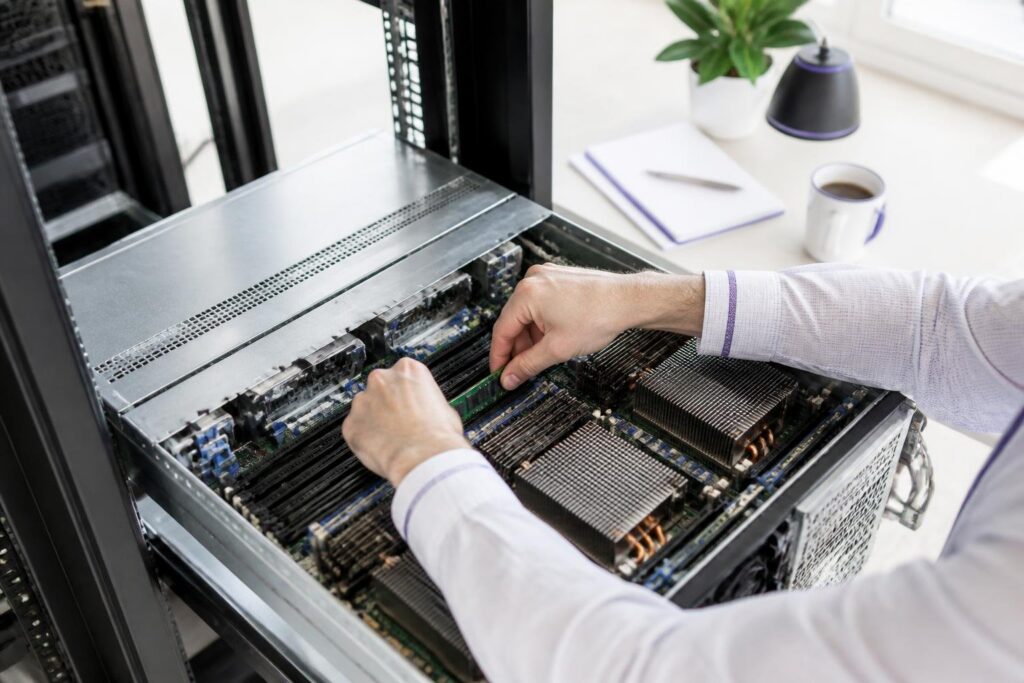
KVM-over-IP or crash cart connections are another routine task: the technician connects the device, confirms you have console access, and steps back. Any configuration work that follows is yours to execute. LED indicator checks – reading fault codes on storage controllers or checking NIC status lights – are similarly within scope. Interpreting diagnostic codes or deciding the next action may require smart hands, depending on the provider’s scope and the authorised method of procedure.
Where authority ends matters as much as what is included. Whether those actions are permitted depends on the provider’s written service scope rather than on the facility label alone.
How to Scope a Remote Hands Ticket So Nothing Gets Lost
A precisely scoped ticket materially improves the chance that a remote-hands request is completed correctly on the first attempt. Vague language – “please check my server” or “something seems wrong with the network” – forces the technician to make assumptions, which introduces delay and increases the risk of the wrong action being taken on live hardware.
A ticket missing the rack unit position or an escalation number can halt work at the worst possible moment.
The minimum information every ticket should include is straightforward but often overlooked under pressure. First, state the exact rack and unit location: cage identifier, cabinet number, and rack unit position. Data centers house hundreds or thousands of servers, and even a one-unit error sends a technician to the wrong machine. Second, describe the task in sequential, plain-language steps.
Providers may bill by incident, included allowance or timed blocks. Confirm minimum billing units, rounding and approval rules in the current rate card. A ticket that runs over without prior authorisation can be paused mid-task while billing approval is sought – precisely the wrong moment to stop during a live incident.
Two details that teams often omit: an escalation contact with a direct phone number, and a clear stop condition. The escalation contact tells the technician who to call if the task produces an unexpected result. The stop condition – “if the drive is not recognized after reseating, do not proceed further” – prevents a well-intentioned technician from taking an action you did not authorize. Both details reduce ambiguity and help prevent unauthorised actions or avoidable follow-up.
A response-time commitment is only useful when it clearly defines whether the target covers acknowledgement, assignment or physical attendance at the cabinet.
What Response Times and Availability Windows Look Like in Practice
A stated “30-minute response” may refer to acknowledgement, technician assignment or physical attendance. Confirm the definition, coverage hours and exclusions in the provider’s written service terms.
Facility Tier does not establish remote-hands staffing levels. Verify separately whether qualified technicians are on-site around the clock, on call, or dispatched from another location, and whether response targets apply during nights, weekends and facility-wide incidents.
An SLA can be technically satisfied without providing timely physical intervention if it measures only acknowledgement. Compare the contractual definition with the operational outcome your workload requires.
Two questions clarify the real response commitment. First, ask whether the quoted time measures ticket acknowledgement, technician assignment or arrival at the cabinet. Second, ask how the request is prioritised during a wider facility incident and what escalation path applies if the target is missed.
If a provider cannot define what its response target measures or explain its escalation process, treat staffing and response capability as unverified rather than assuming that the advertised target guarantees physical intervention.
Response delays may increase during facility-wide incidents or periods of reduced staffing. Ask whether service targets change by time, day, severity or incident scope. Experienced teams build this reality into their maintenance scheduling rather than assuming the stated SLA absorbs it.
When Does a Remote Hands Request Escalate to Smart Hands?
The cost of misclassifying a ticket is concrete: submitting a remote hands request for a task that requires smart hands does not accelerate resolution. Whether a technician may interpret results or choose the next step depends on the contracted service, technician qualification and approved method of procedure. Define permitted actions, decision points and stop conditions in the ticket instead of relying on the service label alone. Identifying that threshold before you file – not after work has halted – is the decision that controls your recovery window.
The distinction between remote hands and smart hands depends on the provider’s service definition, the technician’s permitted scope and the degree of independent diagnosis required. A conditional instruction may still qualify as remote hands when every observation and follow-up action is explicitly defined. Smart hands is more likely to apply when the technician must diagnose the cause or choose an unspecified action.
No precise instruction you write in a ticket can fully substitute for that on-site judgment. Multi-component troubleshooting – where the root cause is unknown and the technician must isolate it through a sequence of steps – follows the same logic.
Remote-hands and smart-hands charges may use included allowances, per-incident fees or timed billing. Confirm minimum units, rounding, reclassification rules and approval requirements before work begins.

These illustrative scenarios show how ticket scope, stop conditions and available diagnostic information can affect the recovery process.
Illustrative Recovery Scenarios
The following hypothetical scenarios illustrate how ticket scope, stop conditions and available diagnostic information can affect recovery. They are not measured cases and do not imply typical recovery times.
These hypothetical scenarios illustrate how ticket scope and stop conditions can affect recovery; they are not measured cases.
The first involves a server that stopped responding after a routine kernel update. The team's initial ticket asked staff to "check the server and get it back online" – an instruction too broad for remote hands to act on safely. The technician performed a power cycle, which interrupted a filesystem check that was already in progress, compounding the problem.
When the team resubmitted with a specific instruction to connect a crash cart, capture console output, and report back before taking any further action, the technician delivered exactly that. The corrective measure – mounting a recovery ISO via IPMI – was then something the team handled remotely themselves. The technician’s role in this scenario was to provide physical access and relay observations, not to diagnose the operating-system failure.
The second scenario involved a degraded RAID array after a drive failure. The team had a spare drive physically installed in the chassis but needed the failed unit identified by slot number and swapped. Because the ticket included the controller model, the expected LED behavior for a failed drive, and the exact slot identifier from their monitoring dashboard, the technician completed the swap promptly once the required context was available.
Clear hardware context in the ticket eliminated every back-and-forth round trip.
The third case – a miscabled network port after a rack migration – took substantially longer than necessary because the team assumed the provider’s migration crew had documented the port assignments. They had not. The scenario illustrates why cabling state and port assignments should be verified before a migration is signed off.
How Providers Price Remote Hands and Where Hidden Costs Appear
Billing may include minimum time blocks, rounding, equipment charges, after-hours rates and emergency surcharges. Obtain a current written rate card and confirm whether work can be reclassified or extended without additional approval.

Pre-contract questions about staffing, escalation and task scope help evaluate the provider’s stated capability, but actual performance should also be reviewed through SLA reporting and completed incidents.
How to Evaluate a Provider's Remote Hands Capability Before You Commit
The most reliable way to evaluate a provider’s remote hands capability is to ask operational questions before you sign – not after your first hardware incident forces the conversation. Headline specifications tell you what hardware sits in the rack. They tell you nothing about whether a qualified technician is on the floor at 2 a.m. on a public holiday, or whether your escalation ticket will reach someone with the authority to act on it.
Ask how technicians are assigned, trained and briefed on the facility, regardless of whether they are employees or contractors. Verify staffing coverage, escalation procedures, access to rack documentation and accountability for completed work.
Ask how the provider distinguishes routine remote-hands tasks from more advanced smart-hands work, and how staffing coverage for each is organised during and outside business hours.
Useful evaluation questions include whether the provider supplies an audit trail for physical work and how unresolved tasks are escalated. Confirm what evidence is actually included, such as timestamps, notes or photographs, and what the escalation path is when the assigned technician cannot resolve the task.
A documented escalation chain is a useful capability indicator, but its effectiveness should be evaluated through written targets, ticket records and incident reviews.
Conclusion – Know What You're Buying Before You Need It
Remote hands service is one of those infrastructure details that feels abstract until the moment you actually need it. By that point, the terms are already fixed, the rate card is already in effect, and the technician on the floor either has the training and authority to resolve your issue or does not.
Staffing model, escalation chain, and after-hours rates must be verified in writing before any incident occurs.
The practical lesson from real operational experience is consistent: Pre-contract evaluation strongly influences the quality of remote-hands support available during an incident, but actual outcomes also depend on staffing, workload, escalation and execution.