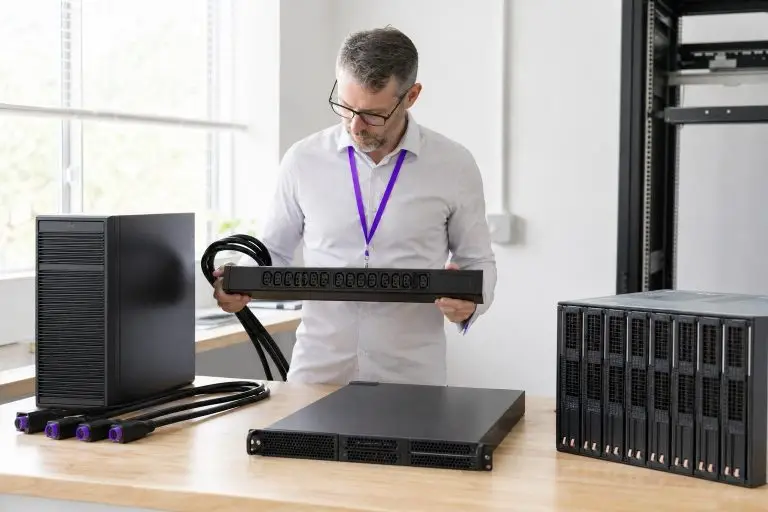

When you order a dedicated server, the physical shape of that machine is rarely the first thing on your mind. Processor cores, RAM capacity, and storage speed tend to dominate the conversation. Yet the form factor — whether the server is a tower, a rack unit, or a blade — determines how the hardware fits into a data center, how it is cooled, how densely it can be deployed alongside other machines, and how easily it scales as your workload grows.
Choosing the wrong form factor does not just create a cabling inconvenience; it can limit expansion options, drive up cooling costs, and complicate future hardware upgrades. This article explains the three primary server form factors in plain terms and maps each one to the deployment scenarios where it performs best. Tower servers resemble large desktop computers and suit environments where space and density are not constraints.
Rack-mounted servers slide into standardized cabinets and dominate professional data centers because of their density and manageability. Blade servers take that density further still, sharing power and cooling infrastructure across multiple compute modules within a single chassis. Each design reflects a deliberate set of trade-offs between cost, airflow, physical footprint, and operational complexity.
What Is a Server Form Factor and Why Does It Shape Your Deployment?
A server form factor is the physical chassis standard that defines a machine's size, shape, mounting method, and internal component layout. That single specification determines far more than appearances: it governs how the server integrates into a physical space, how air moves through it, how many units can occupy a given footprint, and how cabling is routed between machines.
Before a single workload runs, the form factor has already shaped the cooling architecture, the power distribution model, and the realistic ceiling for future expansion.
The cascade effect is easy to underestimate. A tower server, for example, draws cooling air through large side vents and relies on open-air circulation — an approach that works well in a small office environment but becomes inefficient when multiple units are stacked in a confined space.
A rack-mounted unit, by contrast, is engineered to pull cool air in from the front of a standardized cabinet and exhaust heat out the rear, aligning precisely with the hot-aisle and cold-aisle airflow patterns that professional data centers are built around. That alignment is not incidental; it is a prerequisite for predictable thermal management at scale.
Blade servers push this logic further by consolidating power supplies and cooling fans into a shared chassis, so individual compute modules no longer need their own independent thermal systems.
The practical consequence for anyone evaluating dedicated server options is that form factor choice feeds directly into rack space budgeting, power draw per unit, and the provider's ability to accommodate future hardware additions without a full cabinet reshuffle.
A solid understanding of these physical constraints — covered in depth across the dedicated server guides on this site — helps you ask the right questions before committing to a plan, rather than discovering the limitations mid-contract.

A tower server's self-contained chassis eliminates the need for shared infrastructure, giving operators full cooling and power independence from the moment it is switched on.
Tower Servers – Standalone Power Without a Rack
That independence is its defining operational advantage.
A tower contains its own fans and does not require a rack airflow arrangement, but it still depends on adequate room ventilation, temperature control, clearance, and manufacturer-specified inlet conditions — which makes it practical for a small server room, a branch office, or a remote location where a full data center cabinet is neither available nor justified.
The thermal model is worth understanding concretely. Because a tower chassis is designed for open-air environments, its fans and vents are sized for the ambient conditions of a room rather than the tightly controlled airflow channels of a rack cabinet. This means a single tower unit can run quietly and efficiently in a conventional office setting — a meaningful advantage when dedicated IT space is limited. The trade-off emerges as soon as you add a second or third unit.
Towers placed side by side in a confined space begin to recirculate each other's exhaust heat, and without the structured hot-aisle and cold-aisle separation that rack deployments rely on, thermal management becomes increasingly improvised.
Density and future scalability represent the practical ceiling of the tower form factor. Each unit occupies its own floor footprint, requires its own power connection, and must be cabled individually to the network. For a single workload — a database server for a mid-sized office, a local rendering node, or a development environment — that overhead is negligible.
For teams anticipating significant growth, however, the point arrives where adding another tower becomes operationally awkward rather than straightforward. At that stage, transitioning to rack-mounted hardware is the natural next step, and understanding that transition in advance is exactly the kind of decision a structured dedicated server guide addresses in practical detail.
Rack Servers – Density, Standardization, and Data Center Fit
A rack server is a horizontally mounted unit designed to slide into a standardized cabinet, with its height measured in rack units — commonly written as U, where one U equals 1.75 inches of vertical cabinet space. That standardization is the foundation of every professional data center deployment. A 1U server occupies a single slot in the cabinet, a 2U unit takes two, and so on up to 4U configurations that accommodate more cooling headroom or additional drive bays.
A single 42U cabinet can shift from a handful of large nodes to dozens of slim servers simply by changing the workload mix.
A typical 42U cabinet can therefore house anywhere from a handful of large 4U machines to dozens of slim 1U nodes, depending on the workload mix.
The practical advantage of this system goes beyond physical tidiness. Because every rack-mounted unit follows the same width standard, a data center operator can plan cabinet capacity precisely — calculating power draw per rack, mapping cable runs to patch panels, and reserving slots for future hardware without guesswork.
Hot-aisle and cold-aisle separation, the industry-standard airflow arrangement where server exhaust faces one corridor and cool intake air faces the other, only functions reliably when equipment is mounted in consistent, predictable rows. A rack server's front-to-back airflow design is engineered specifically for this environment, which is why rack-mounted hardware dominates co-location facilities and enterprise data centers.
Density also simplifies remote management. When dozens of servers share a single cabinet, centralised out-of-band management simplifies remote administration across many rack servers, although power, production-network, and management connectivity still require structured cabling. That operational efficiency is one reason rack configurations scale more gracefully than tower deployments as workload demands grow.

The fixed cost of a blade enclosure means operators are paying for shared infrastructure capacity before every compute slot is filled, making partial deployments an expensive proposition.
Blade Servers – Maximum Density and Shared Infrastructure
The shared-chassis model described earlier creates a specific economic threshold that operators often overlook: the enclosure itself represents a fixed upfront cost that must be justified before a single compute module delivers value. A half-populated blade chassis is rarely cheaper than an equivalent count of 1U rack servers — the savings only materialise once slot utilisation crosses a meaningful percentage, varies by vendor, configuration, licensing, power costs, and the rack-server alternative. Blade economics improve as more enclosure capacity is used because the chassis, management modules, switching, and power infrastructure are shared across additional blades.
Deploying blades speculatively, on the assumption that workloads will eventually fill the chassis, carries real capital risk if growth stalls.
There is also a vendor lock-in dimension that rack deployments largely avoid. Blade modules are not interchangeable across manufacturers, and in most cases not even across chassis generations from the same vendor. An operator who needs to refresh compute mid-lifecycle may find that newer, more efficient modules require a chassis upgrade as well — compounding the replacement cost in ways that a straightforward 1U swap does not.
Understanding that constraint before committing to a blade architecture is more consequential than the density arithmetic alone.
The practical implications become clear at scale. A single blade enclosure can house anywhere from eight to sixteen compute modules — or more, depending on the chassis design — while sharing a small number of redundant power supplies and a unified switching fabric. That consolidation reduces the number of individual power connections, network cables, and cooling units required compared to an equivalent count of traditional rack servers.
For operators running high-density workloads such as large-scale virtualization, AI inference clusters, or financial trading platforms, this architecture can meaningfully reduce the physical footprint and the operational complexity of managing many discrete nodes. A blade enclosure can provide high-bandwidth internal switching with fewer external cables. Communication is faster only when the installed fabric modules, interface speeds, topology, and workload are superior to the corresponding rack-server network.
The trade-off is upfront investment and reduced flexibility. Blade enclosures represent a significant capital commitment, and each module must be compatible with the specific chassis vendor's ecosystem — limiting hardware mix-and-match options. Blades are therefore most appropriate for enterprises that have already standardized their infrastructure and need to grow within a predictable, high-density architecture.
How Do Cooling and Airflow Requirements Differ Across Form Factors?
Cooling requirements vary significantly across form factors, and in some environments that thermal reality alone determines which chassis type is viable. Tower servers use active cooling, typically with front-to-back or internally directed fans. Their larger chassis may permit slower fans and less concentrated heat output, but adequate airflow and suitable ambient temperature are still required.
This approach can be sufficient in a small office or server room provided that inlet-air temperature, humidity, clearance, and airflow remain within the server manufacturer's environmental specifications.
Rack servers introduce more concentrated heat output within a confined cabinet. A fully populated rack can generate substantial thermal load across a narrow vertical column of equipment, which is why data centers route cool air through the front face of each unit and exhaust hot air out the rear into a dedicated hot aisle.
Hot-aisle and cold-aisle containment — the practice of physically separating intake air from exhaust air using barriers or enclosed corridors — is standard practice in well-engineered facilities and directly affects how reliably servers maintain safe operating temperatures under sustained load. Without this discipline, recirculating hot air shortens component lifespan and increases the risk of thermal throttling, where a processor reduces its clock speed to prevent overheating.
Thermal design power ratings translate directly into concrete uptime and hardware longevity decisions — a relationship worth understanding in detail before finalising any form factor choice, particularly for rack and blade deployments where heat density is highest.
Blade enclosures place the greatest demand on cooling infrastructure. Because multiple compute modules share a single chassis and operate in close proximity, the enclosure must push high volumes of conditioned air through a precisely engineered airflow path at all times. Blade enclosures require cooling infrastructure designed for their heat density and airflow requirements. Depending on the facility, this may involve precision room cooling, contained hot and cold aisles, in-row cooling, rear-door heat exchangers, or another engineered solution capable of keeping inlet conditions within specification.

Choosing a server form factor commits an organization to recurring operational expenses around power consumption, cable management, and physical floor space that compound over the life of the hardware.
Cabling, Power Draw, and Physical Footprint – the Hidden Operational Costs
The physical form factor you choose carries operational costs that never appear on a hardware spec sheet. Power draw, cable volume, and floor space all translate directly into recurring expenses — whether you are renting colocation space by the rack unit or running equipment on-premises in a dedicated server room.
Spatial inefficiency compounds quietly: a tower in a colocation rack can cost significantly more over three years than an equivalent 1U server.
Power consumption depends primarily on the installed processors, memory, drives, accelerators, power-supply efficiency, and workload—not on the chassis shape alone. Tower servers may simplify small deployments, while rack and blade systems can improve infrastructure efficiency at higher density. Towers often require less elaborate cable management than dense racks. A single tower typically draws power from one standard outlet and uses a handful of network cables. That simplicity is an advantage in small deployments, but it creates a different problem at scale: towers do not stack, so expanding capacity means claiming more floor space. In a colocation environment, providers charge by the rack unit or by the square foot of floor space occupied.
A tower placed on a dedicated shelf or in a tower-to-rack conversion kit consumes far more vertical real estate than a 1U rack server delivering equivalent compute. Over a multi-year contract, that spatial inefficiency compounds into a meaningful cost difference.
Rack servers consolidate that footprint dramatically, but they introduce their own cable management burden. A fully populated 42U cabinet can carry dozens of power cables, network patch leads, and management cables simultaneously. Without structured cable management — using cable arms, velcro ties, and labeled patch panels — airflow is obstructed and troubleshooting becomes time-consuming.
Power distribution planning is equally critical: each unit draws from a power distribution unit inside the cabinet, and exceeding the PDU's rated amperage is a real operational risk that requires careful load calculation before provisioning.
Blade enclosures shift much of this complexity to the chassis level, centralizing power and cabling for all modules. That consolidation reduces per-blade cable count significantly, but it concentrates power demand into a single footprint that requires high-amperage circuits from the outset.
Which Form Factor Fits Which Workload and Team Size?
The right form factor is determined by three intersecting factors: the nature of the workload, the physical environment where the server will run, and the operational capacity of the team managing it. Matching these three dimensions before evaluating hardware configurations saves significant time and avoids costly mid-contract changes.
Tower servers align naturally with smaller teams and distributed deployments. A business running a regional office server, a branch-level database, or an edge caching node benefits from the tower's independence — no specialized rack infrastructure, no colocation contract, and no requirement for dedicated data center staff. The setup is approachable for a small IT team or even a technically capable non-specialist.
Where tower deployments become problematic is at the point of scaling: adding a second or third unit multiplies floor space and cable complexity without the density benefits that a rack environment delivers.
Rack servers are the practical default for most hosted dedicated workloads. A SaaS platform handling steady traffic, a high-traffic e-commerce environment, or a database cluster supporting a financial application all benefit from the standardized mounting, structured cable management, and proximity to redundant power and network infrastructure that a rack cabinet provides.
Rack-mounted density also simplifies capacity planning — adding compute means sliding in another unit, not reconfiguring a room. Most colocation providers and dedicated hosting facilities are built around this form factor, which keeps provisioning timelines predictable.
Blade enclosures suit enterprise-scale teams running parallel compute workloads — AI inference pipelines, large-scale video transcoding, or multi-tenant SaaS platforms requiring many isolated compute nodes in a compact footprint. The shared chassis model demands upfront infrastructure investment and in-house expertise to manage.

When a workload grows beyond what a given chassis architecture can accommodate, the migration to a new form factor introduces both measurable downtime and unplanned capital expenditure.
Scalability Trade-Offs – What Happens When Your Workload Outgrows the Chassis?
Scalability friction is one of the most underestimated consequences of form factor selection. The decision rule most operators reach too late is simple: choose the form factor whose natural scaling axis matches your workload's growth axis, not just its current size.
A subtler constraint appears when growth is uneven across resource types. A rack deployment can absorb a GPU-heavy node next to a storage-dense node without architectural compromise — each unit is self-contained. A blade chassis, by contrast, shares switching fabric and power budget across slots. Whether a power-hungry blade throttles neighbours, is refused admission, or is limited alone depends on the chassis, power-capping features, and management policy — automatic throttling of adjacent blades is not universal.
That interaction between per-module demand and shared enclosure capacity is a scaling ceiling that raw slot counts do not reveal. As noted under the cooling and airflow section, facility power headroom compounds this constraint further.
Tower servers can scale horizontally through standard Ethernet networking, clustering software, load balancers, orchestration platforms, and centralized management tools. A shared chassis or backplane is not required for horizontal scaling. Their disadvantage at scale is physical rather than architectural: multiple towers consume more floor space, require more individual power and network connections, and are harder to service efficiently than rack-mounted systems. Organizations may therefore migrate to rack hardware for density and operational convenience, not because tower servers are unable to form a cluster.
Rack servers offer a more linear growth path. When a workload demands additional compute, an operator adds another unit to the cabinet. Incremental rack expansion requires only that free slots exist and that power and network capacity in the cabinet can absorb the addition. The practical ceiling is the cabinet itself: a fully populated rack forces either a second cabinet or a denser hardware upgrade.
Neither is disruptive in the way a cross-form-factor migration is, which makes rack infrastructure a lower-risk starting point for teams anticipating steady growth.
Blade enclosures present the opposite dynamic. Expansion within a populated enclosure is fast — inserting a new blade module takes minutes. But once the enclosure is full, the next growth step means procuring an entirely new chassis, which carries the same upfront infrastructure cost as the original deployment.
Dedicated Server Form Factors: Tower vs. Rack vs. Blade
| Criterion | Tower | Rack | Blade |
|---|---|---|---|
| Physical Footprint | Standalone upright chassis; floor or desk placement, no rack needed | Mounts in standard cabinet; height measured in U increments | Multiple compute nodes share one dense enclosure; highest density |
| Cooling Approach | Each unit manages its own airflow independently via internal fans | Shared cabinet airflow; dense packing increases cooling engineering burden | Centralized cooling within shared chassis; single system serves all nodes |
| Scalability | Scales poorly beyond a handful of units; no shared mounting standard | Standardized cabinet slots allow straightforward addition of new units | High node density per chassis; adding nodes requires chassis capacity |
| Infrastructure Requirements | Needs only a power outlet and adequate ventilation to operate | Requires physical rack enclosures, cable management, and dedicated cooling | Requires shared chassis infrastructure; single failure can affect multiple nodes |
| Deployment Complexity | Minimal; operational within hours, no specialist installation needed | Moderate; standardized mounting simplifies data center provisioning | High; centralized power and cooling add provisioning and maintenance complexity |
Conclusion – Choosing the Form Factor That Serves Your Infrastructure Long-Term
Form factor is not a cosmetic choice. It determines how your hardware fits into a physical space, how cooling and power are distributed across that space, and how much friction you encounter when the workload grows. The decision ultimately comes down to three criteria: how your workload scales, how large your operational team is, and which direction your infrastructure needs to grow.
A workload that stays bounded and self-contained points toward a tower; one that grows incrementally alongside a managed facility points toward rack; one that demands maximum node density within a fixed footprint — and has the in-house expertise to match — points toward blade. Getting that alignment right before the first server ships is what prevents a costly cross-form-factor migration later.
Picking the wrong form factor early can force a full hardware migration before your workload ever reaches its peak.
A blade enclosure delivers maximum compute density for enterprise-scale parallel workloads, but only when the supporting infrastructure and in-house expertise are already in place. Matching the right chassis to the right operational context from the start avoids the cost and disruption of a cross-form-factor migration later.




